

If you are looking for ways to rank your website on Google, using the best SEO tools can make website optimization significantly easier. These tools help you discover effective keywords, which increases the likelihood of gaining organic traffic.
With their help, you can identify technical issues affecting your website’s ranking, track active backlinks, analyze your competitors, and audit your website’s pages.
If you have just launched your website, there is no need to spend money on expensive SEO platforms right away. Even with limited features, free tools can prove to be quite helpful in improving your website’s ranking.
In this guide, we will explore some of the best SEO tools for websites that will help users make informed decisions about their site’s ranking and increase organic traffic. We will also look at which SEO tools are the most effective.
What Are SEO Audit Tools?
These tools help you understand and improve your SEO strategy while also assisting in fixing technical issues on your website. Before building a website, people often conduct research on specific topics—this is where these tools prove highly useful. They provide detailed insights into your website, allowing you to identify issues such as slow page speeds, broken links, or missing pages. They offer SEO data that enables you to make informed decisions based on accurate information.
These tools can show you which pages are receiving clicks and impressions on Google. However, no tool can guarantee that a website will rank on the first page. Google primarily ranks pages based on useful and original content, relevance to search intent (the user’s purpose for searching), site quality, and user experience.
Best SEO Tools Software: Quick Overview
| Tool | Best for | Option |
| Google Search Console | Search performance and indexing | Yes, fully free |
| Google Analytics 4 | Visitor behavior and conversions | Yes, fully free |
| Google Trends | Topic and seasonal demand | Yes, fully free |
| Google Keyword Planner | Keyword ideas | Free with a Google Ads account |
| PageSpeed Insights | Speed and Core Web Vitals | Yes, fully free |
| Ahrefs | Backlinks and keyword research | Limited (Ahrefs Webmaster Tools) |
| Rank Math / Yoast SEO | On-page SEO in WordPress | Free versions available |
| Semrush | All-in-one SEO and competitor research | Limited free plan |
Best SEO Tools Free: Start With These
Google Search Console
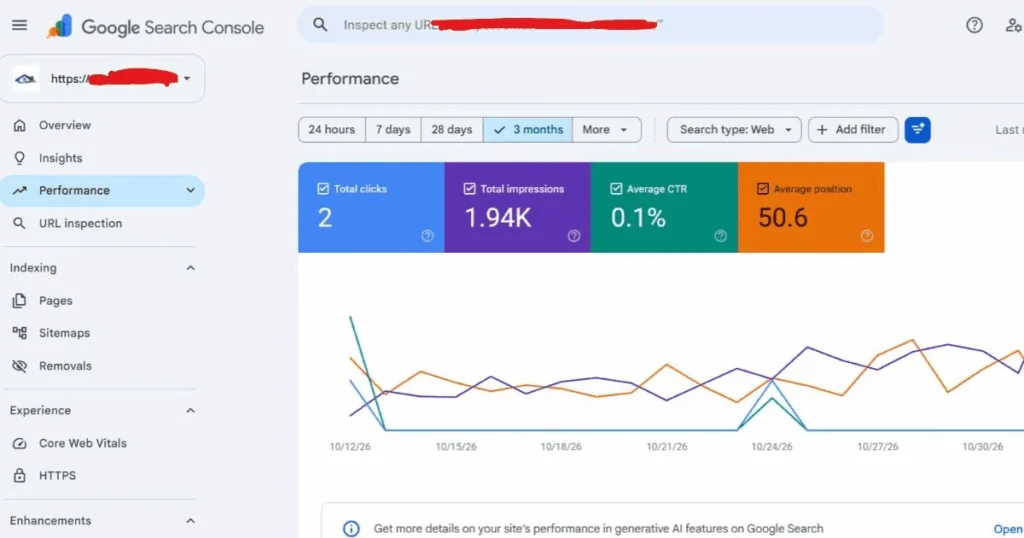
Google Search Console is a key tool for this purpose. It is entirely free. Once you have set up your website on it,
Using Search Console, you can:
- Check whether website pages are indexed.
- XML: Submit a sitemap.
- Identify user search queries.
- Inspect the specific URL.
- Track clicks and impressions.
- Monitor Core Web Vitals
- Detect indexing-related issues.
- Grant access control to other users if needed.
For example, suppose you are unable to submit a sitemap; you can use this tool to identify the actual issues and fix them.
Google Analytics 4
Google Search Console shows clicks and impressions, while Google Analytics 4 reveals what happens after those clicks. It shows how many people visit your site, which countries they come from, what they do once they arrive, and which pages lead to sales, sign-ups, or inquiries.
You can check using Google Analytics 4.
- Traffic Sources: Where visitors came from—Google, Facebook, YouTube, or direct access.
- Location: The countries from which visitors arrived.
- Engagement: How much time visitors spend on your website.
- Page Views: The number of pages viewed.
- Total Users: The total number of people who visited your website.
Google Trends
Google Trends shows which topics and keywords are currently trending among users on Google. It is a free tool provided by Google.
How can you use Google Trends?
- Trending Keywords: What people search on Google
- Keyword comparison: Comparing two different keywords.
- Seasonal trends: Identifying when specific keywords are being searched for.
- Country selection: You can view data for countries such as the US, the UK, etc.
Google Keyword Planner
Google Keyword Planner is a free tool that helps you find the right keywords. Although its primary function is managing Google Ads, you can also use it to discover new keywords for your website.
How to use Keyword Planner
Suppose your main keyword is “Kitchen”; the tool will provide related keyword ideas, such as
- Kitchen remodel ideas
- Small kitchen remodel
- Kitchen renovation costs
- Modern kitchen design
- Kitchen cabinets
You can use these keywords for blog posts on your website. Initially, avoid selecting keywords with very high search volumes.
PageSpeed Insights
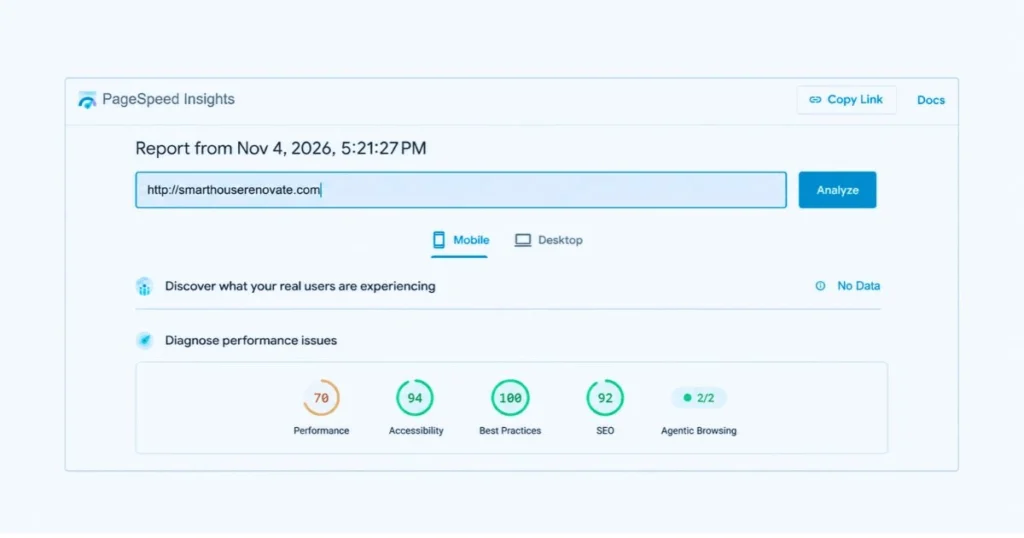
This is one of the best free SEO tools available. You can use it to check your site’s speed on both mobile and desktop. It shows how quickly your site loads and what its overall performance is like.
What can you check using PageSpeed Insights?
- Core Web Vitals: You can evaluate aspects such as content, layout, and site responsiveness (i.e., how well the site reacts when a user interacts with it).
- Performance: You can determine how long it takes for your site to load.
- Accessibility: You can assess how user-friendly or accessible your site is for visitors.
Ahrefs
Ahrefs is a popular SEO platform that assists website owners with keyword research and backlink analysis; it is the best SEO tool. It is available for free, although with limited features.
Ahrefs for Backlink Research
- By analyzing your competitors, you can improve your website to outperform them.
- This provides insights into linking opportunities, content ideas, and valuable keywords.
- Remember, the goal is to understand how to make your website better than your competitors’, not to copy their design or content.
Rank Math
If you use WordPress, Rank Math can simplify basic on-page SEO for your website.
Here is how you can use it:
- It helps manage settings related to focus keywords, meta descriptions, titles, XML sitemaps, and schema markup.
- With this tool, you can verify whether your on-page SEO elements are configured correctly.
Semrush
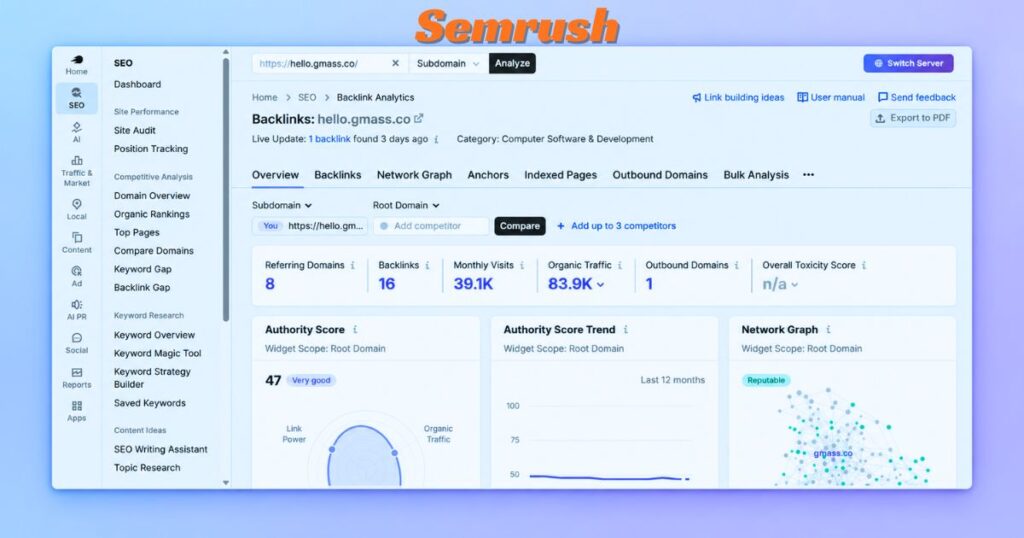
When it comes to the best SEO tools, Semrush is highly popular among users in the US. It can be used in various areas, such as keyword research, backlink analysis, competitor analysis, content research, and website audits.
Why use Semrush?
- For keyword ideas
- Competitor keywords
- Organic search traffic
- Backlinks
- Keyword difficulty
- Technical SEO issues
- Content opportunities
By entering a competitor’s website, you can identify which keywords are driving the most traffic. You can then create unique, high-quality content around those keywords—content that outperforms your competitor’s—while ensuring it is free from plagiarism. Although a paid plan is available, if you are just starting out, you can begin with basic research using the free version.
How To Identify The Best SEO Tools?
Before choosing the best SEO tools for your website, define your goals and clearly understand what you want to achieve with them.
For beginners, here are some tools for keyword research, backlinks, and technical SEO: These tools provide basic information for free.
- Google Search Console
- Google Analytics
- Google Trends
- PageSpeed Insights
- Semrush
- Ahrefs
Best SEO Tools for Small Businesses
Small Businesses typically have limited time and budget. The best SEO tools for them are those that save time, increase efficiency, and deliver quick results.
A Practical Toolkit for Small Businesses
- To get started, use Google Search Console and Google Analytics 4.
- If you serve customers in a specific area, use Google Business Profile to increase your local visibility.
- Use Ahrefs Webmaster Tools for competitor research.
- For WordPress, use plugins like Rank Math or Yoast SEO to manage titles, meta descriptions, and sitemaps.
- Use Semrush or Ahrefs for keyword research and backlink analysis.
Pros And Cons of The Best SEO Tools
Pros
Saves time on research
Insights into competitors’ keywords
Identifying reasons for not ranking
Understanding search performance
Monitoring website growth
Cons
Advanced features are often found in paid tools.
Different tools may show varying data.
SEO tools cannot guarantee Google rankings.
Conclusion
The Best SEO Tools are those that provide essential information about your website and help you make better decisions. If you are just starting out, you can build a robust, free SEO toolkit using Google Search Console, Google Analytics, Google Trends, and PageSpeed Insights.
Frequently Asked Questions FAQs
Free vs. Paid SEO Tools: Which Is Right?
While free tools are great for beginners, paid platforms are better suited for professionals handling complex tasks like in-depth competitor research, extensive keyword databases, backlink analysis, and automated reporting.
What Are The Best SEO Tools For Keyword Research?
If you are looking for free keyword research tools, Ahrefs, Google Keyword Planner, and Semrush are the best SEO tools.
Which is the best SEO tool for on-page SEO?
Rank Math and Yoast SEO tools are suitable for on-page SEO.
Which tool is available for free for keyword research?
Google Trends is a free tool from Google for keywords. Alternatively, you can use Ahrefs, though it is a paid tool.
Leave a Reply